MinimalWorkingExamples.jl
Turn a snippet of Julia code into a shareable, self-contained Markdown block for pasting into a GitHub issue, Discourse post, or Slack message.
Inspired by the R package reprex.
Installation
MinimalWorkingExamples can be installed directly from the Julia package manager. In the Julia REPL, press ] to enter the Pkg mode, then run:
pkg> add MinimalWorkingExamplesBasic usage
The quickest way: copy your code to the clipboard, then call mwe() with no arguments:
using MinimalWorkingExamples

mwe()
Or write your code in a begin...end block and pass it to @mwe directly:
@mwe begin
    using Statistics
    x = [1, 2, 3, 4, 5]
    mean(x)
endEither way, this runs the code as a script in a fresh Julia process with a clean temporary environment, copies the result to your clipboard, and shows a preview of the rendered Markdown:
using Statistics
x = [1, 2, 3, 4, 5]
mean(x)
#> 3.0Environment
Julia Version 1.13.1
Commit 96ca370cf0e (2026-09-25 19:34 UTC)
Build Info:
  Official https://julialang.org release
Platform Info:
  OS: Linux (x86_64-linux-gnu)
  CPU: 4 × AMD EPYC 7763 64-Core Processor
  WORD_SIZE: 64
  LLVM: libLLVM-20.1.8 (ORCJIT, znver3)
  GC: Built with stock GC
Threads: 1 default, 1 interactive, 1 GC (on 4 virtual cores)
Environment:
  JULIA_PKG_SERVER =
The value of each statement is shown as #> (assignments and definitions like function/struct are skipped), as are any print calls and log messages (@warn, @info) in the code.
The result is returned as a MWEResult, so you can access the Markdown string directly if the clipboard is unavailable:
result = @mwe begin
    1 + 1
end
print(result.md)  # print the Markdown string
mwe() and @mwe accept the same keyword arguments.
Venue
The venue keyword controls the output format. Use :gh (default) for GitHub, Discourse, and other platforms that render GitHub-Flavored Markdown, :discord for Discord, and :slack for Slack.
@mwe begin
    1 + 1
end venue=:slack
:discord matches :gh but renders the attribution footer using Discord's -# subtext syntax instead of <sup>.
:slack strips the language identifier from the code fence (Slack doesn't render language-tagged fences) and omits the attribution footer.
Errors
If the code throws an error, it is captured and shown as a #> comment. The stacktrace is included in a collapsible block below the code:
@mwe begin
    x = [1, 2, 3]
    x[10]
end versioninfo=false
Output:
x = [1, 2, 3]
x[10]
#> ERROR: BoundsError: attempt to access 3-element Vector{Int64} at index [10]Stacktrace
 [1] throw_boundserror(A::Vector{Int64}, I::Tuple{Int64})
   @ Base ./essentials.jl:15
 [2] getindex(A::Vector{Int64}, i::Int64)
   @ Base ./essentials.jl:919
 [3] top-level scope
   @ none:1
Plots
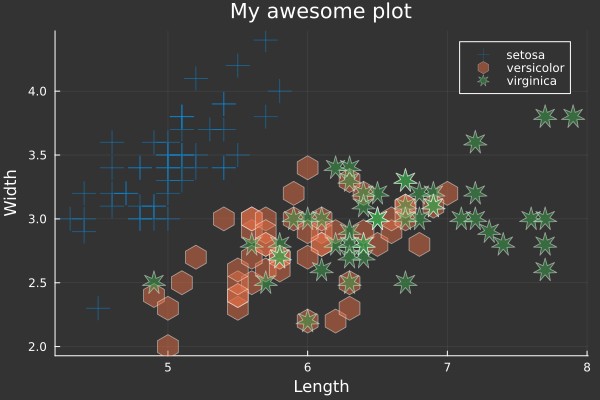
Any plot produced while running the code is saved as a PNG file and replaced in the Markdown with a **Insert plot here: <path>** placeholder at the position it was produced. Files land in the plot_dir directory (default MWEPlots/, created next to your working directory); upload them alongside the generated Markdown.
Copy the following code, taken from the Plots.jl documentation, and call mwe() on it; this is the output:
# load a dataset
using RDatasets
iris = dataset("datasets", "iris");

# load the StatsPlots recipes (for DataFrames) available via:
# Pkg.add("StatsPlots")
using StatsPlots

# Scatter plot with some custom settings
@df iris scatter(
    :SepalLength,
    :SepalWidth,
    group = :Species,
    title = "My awesome plot",
    xlabel = "Length",
    ylabel = "Width",
    m = (0.5, [:cross :hex :star7], 12),
    bg = RGB(0.2, 0.2, 0.2)
)
Environment
Julia Version 1.13.1
Commit 96ca370cf0e (2026-09-25 19:34 UTC)
Build Info:
  Official https://julialang.org release
Platform Info:
  OS: Linux (x86_64-linux-gnu)
  CPU: 4 × AMD EPYC 7763 64-Core Processor
  WORD_SIZE: 64
  LLVM: libLLVM-20.1.8 (ORCJIT, znver3)
  GC: Built with stock GC
Threads: 1 default, 1 interactive, 1 GC (on 4 virtual cores)
Environment:
  JULIA_PKG_SERVER =
Including environment details
Two independent, opt-in-or-out blocks can be appended after the code:
versioninfo: appends the output ofversioninfo()in a collapsible "Environment" block. Defaults totruefor:gh, andfalsefor:discordand:slack, since collapsible<details>blocks aren't rendered outside GitHub-Flavored Markdown.manifest=false: passmanifest=trueto append the fullManifest.tomlin a collapsible block, so anyone can reproduce your exact package versions. Same caveat about<details>rendering applies for:discord/:slack.
@mwe begin
    using DataFrames
    df = DataFrame(a = 1:3, b = ["x", "y", "z"])
    df
end manifest=true
Pinning a specific package version
Use packagespecs to pin one or more packages to a particular version, git revision, or URL.
using Pkg

@mwe begin
    using Example
    Example.hello("World")
end packagespecs=[PackageSpec(name="Example", version="0.5.3")] versioninfo=false
Output:
using Example
Example.hello("World")
#> "Hello, World!"For more details on packagespecs options see Pkg.PackageSpec documentation.
Reproducing an exact environment
Pass manifest_path to use an existing Manifest.toml as-is.
@mwe begin
    using Example
    Example.hello("World")
end manifest_path="/path/to/your/Manifest.toml"